

Developing India’s EV ecosystem with ultrafast charging
Ultrafast, Dependable Charging For All
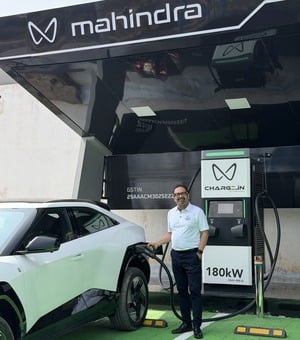
180 kW Ultrafast Charging
Get a quick boost during long trips. Go from 20% to 80% state of charge in just 20 minutes (Mahindra eSUVs)
App Based
Use the CHARGE_iN app to find stations, charge and pay. Also available on Me4U and other leading aggregator platforms.
Open to All
Open and accessible network for all e4W users
Comfortable Charging Breaks
Located at sites with quality restaurants, cafes and clean washrooms for a convenient charging break

The CHARGE_iN app makes your journey smoother with features like trip planning and navigation, integrated payment solutions, slot reservations, and more
News and Press Releases
20 March 2026
Charge_iN by Mahindra Signs Strategic Agreement with HPCL
Strengthen Electric Vehicle Charging Infrastructure
Expanding soon across India’s major highway corridors
NO. OF AC CHARGERS
-AC CAPACITIES (IN KWH)
NO. OF DC CHARGERS
2DC CAPACITIES (IN KWH)
NO. OF CCS2 CONNECTORS
4NO. OF AC CHARGERS
-AC CAPACITIES (IN KWH)
NO. OF DC CHARGERS
2DC CAPACITIES (IN KWH)
NO. OF CCS2 CONNECTORS
4NO. OF AC CHARGERS
-AC CAPACITIES (IN KWH)
NO. OF DC CHARGERS
2DC CAPACITIES (IN KWH)
NO. OF CCS2 CONNECTORS
4NO. OF AC CHARGERS
-AC CAPACITIES (IN KWH)
NO. OF DC CHARGERS
2DC CAPACITIES (IN KWH)
NO. OF CCS2 CONNECTORS
4NO. OF AC CHARGERS
-AC CAPACITIES (IN KWH)
NO. OF DC CHARGERS
2DC CAPACITIES (IN KWH)
NO. OF CCS2 CONNECTORS
4NO. OF AC CHARGERS
-AC CAPACITIES (IN KWH)
NO. OF DC CHARGERS
2DC CAPACITIES (IN KWH)
NO. OF CCS2 CONNECTORS
4NO. OF AC CHARGERS
-AC CAPACITIES (IN KWH)
NO. OF DC CHARGERS
2DC CAPACITIES (IN KWH)
NO. OF CCS2 CONNECTORS
4NO. OF AC CHARGERS
-AC CAPACITIES (IN KWH)
NO. OF DC CHARGERS
2DC CAPACITIES (IN KWH)
NO. OF CCS2 CONNECTORS
4NO. OF AC CHARGERS
-AC CAPACITIES (IN KWH)
NO. OF DC CHARGERS
2DC CAPACITIES (IN KWH)
NO. OF CCS2 CONNECTORS
4NO. OF AC CHARGERS
-AC CAPACITIES (IN KWH)
NO. OF DC CHARGERS
1DC CAPACITIES (IN KWH)
NO. OF CCS2 CONNECTORS
2NO. OF AC CHARGERS
-AC CAPACITIES (IN KWH)
NO. OF DC CHARGERS
2DC CAPACITIES (IN KWH)
NO. OF CCS2 CONNECTORS
4NO. OF AC CHARGERS
-AC CAPACITIES (IN KWH)
NO. OF DC CHARGERS
2DC CAPACITIES (IN KWH)
NO. OF CCS2 CONNECTORS
4NO. OF AC CHARGERS
-AC CAPACITIES (IN KWH)
NO. OF DC CHARGERS
2DC CAPACITIES (IN KWH)
NO. OF CCS2 CONNECTORS
4NO. OF AC CHARGERS
-AC CAPACITIES (IN KWH)
NO. OF DC CHARGERS
2DC CAPACITIES (IN KWH)
NO. OF CCS2 CONNECTORS
4NO. OF AC CHARGERS
-AC CAPACITIES (IN KWH)
NO. OF DC CHARGERS
2DC CAPACITIES (IN KWH)
NO. OF CCS2 CONNECTORS
4NO. OF AC CHARGERS
-AC CAPACITIES (IN KWH)
NO. OF DC CHARGERS
2DC CAPACITIES (IN KWH)
NO. OF CCS2 CONNECTORS
4NO. OF AC CHARGERS
-AC CAPACITIES (IN KWH)
NO. OF DC CHARGERS
2DC CAPACITIES (IN KWH)
NO. OF CCS2 CONNECTORS
4NO. OF AC CHARGERS
-AC CAPACITIES (IN KWH)
NO. OF DC CHARGERS
2DC CAPACITIES (IN KWH)
NO. OF CCS2 CONNECTORS
4NO. OF AC CHARGERS
-AC CAPACITIES (IN KWH)
NO. OF DC CHARGERS
2DC CAPACITIES (IN KWH)
NO. OF CCS2 CONNECTORS
4NO. OF AC CHARGERS
-AC CAPACITIES (IN KWH)
NO. OF DC CHARGERS
2DC CAPACITIES (IN KWH)
NO. OF CCS2 CONNECTORS
4NO. OF AC CHARGERS
-AC CAPACITIES (IN KWH)
NO. OF DC CHARGERS
2DC CAPACITIES (IN KWH)
NO. OF CCS2 CONNECTORS
4NO. OF AC CHARGERS
-AC CAPACITIES (IN KWH)
NO. OF DC CHARGERS
2DC CAPACITIES (IN KWH)
NO. OF CCS2 CONNECTORS
4NO. OF AC CHARGERS
-AC CAPACITIES (IN KWH)
NO. OF DC CHARGERS
2DC CAPACITIES (IN KWH)
NO. OF CCS2 CONNECTORS
4NO. OF AC CHARGERS
-AC CAPACITIES (IN KWH)
NO. OF DC CHARGERS
2DC CAPACITIES (IN KWH)
NO. OF CCS2 CONNECTORS
4NO. OF AC CHARGERS
-AC CAPACITIES (IN KWH)
NO. OF DC CHARGERS
2DC CAPACITIES (IN KWH)
NO. OF CCS2 CONNECTORS
4NO. OF AC CHARGERS
-AC CAPACITIES (IN KWH)
NO. OF DC CHARGERS
2DC CAPACITIES (IN KWH)
NO. OF CCS2 CONNECTORS
4Please obtain a google maps api key and put it in Site Preferences!
We're sorry, we couldn't find results for your search.
Reach out to us
Highway Charging FAQs
What is CHARGE_iN by Mahindra?
CHARGE_iN by Mahindra is creating a next-generation public EV charging network across India to make electric mobility effortless and accessible. The CHARGE_iN app offers intelligent features such as trip planning, digital payments, and slot reservations, all designed within a seamless and intuitive user experience.
This initiative prioritizes ultrafast, safe, and reliable charging to reduce range anxiety and accelerate India’s transition to electric mobility.
Are CHARGE_iN stations available 24x7?
Most CHARGE_iN charging stations operate 24x7. However, availability may vary depending on location access and local operating hours. You can view real-time station status and timings directly in the CHARGE_iN app before your visit.
What is a Captive/Restricted Station?
Captive or restricted stations are privately owned charging points—such as those in office premises—with limited access to authorized users only.
Why are location pins shown in different colors on the map?
Pin colors indicate the live status of each station or connector:
- Green: At least one connector available
- Amber: All connectors occupied
- Grey: Station temporarily unavailable
How can I find the nearest available CHARGE_iN charging station?
- Open the ‘Nearby Stations’ tab on the home screen.
- View nearby charging points on the interactive map.
- Swipe through station cards or tap the map pins to explore and select your preferred station.
How do I add my vehicle to the app?
On the home page, tap ‘More’ in the bottom navigation bar. Select your profile (displayed as your name), choose ‘Manage Vehicle,’ and add or delete vehicles as required.
Can I book a charging slot in advance?
Yes. You can reserve a slot in advance through the app. After selecting a location and connector, tap the calendar + car icon on the booking screen to schedule your session for a specific date and time.
Is there a fee for advance reservations?
No, there is currently no fee for making a reservation. However, if you are unable to visit the station at the reserved time, please cancel the booking to make the slot available for other users.
How do I add money to my CHARGE_iN wallet?
- Tap the Wallet icon on the home page.
- Select ‘Top Up.’
- Enter the desired amount and proceed to payment.
- Choose your preferred payment method and complete the transaction.
What payment methods are supported?
CHARGE_iN accepts all major digital payment options including credit/debit cards, net banking, and UPI.
Can I pay with cash?
No. All payments must be made digitally through the CHARGE_iN app.
Is there a minimum wallet balance required to start charging?
Yes. A minimum balance of ₹100 is required to initiate charging. Additionally, 1.2 times the estimated charging cost is temporarily blocked to begin the session.
Example: For a ₹1,000 charging session (including GST), your wallet must have a minimum balance of ₹1,200 (including GST).
How do I start a charging session?
- Select your preferred station from the map or card slider.
- Choose the desired connector.
- Select a billing unit — Time, SoC, Amount, or Energy (kWh).
- Review your booking and proceed to payment (top up if needed).
- After completing the transaction, you can view recent sessions in the ‘History’ section on the home screen.
How long does charging take?
CHARGE_iN delivers an ultrafast charging experience through high-speed chargers. However, charging time may vary depending on your vehicle’s Battery Management System (BMS), battery size, and power acceptance rate.
Can I monitor the state of charge during charging?
Yes. The app displays your EV’s live state of charge (SoC) throughout the session.
Why does the final price differ from the estimated price?
The estimated amount may vary based on factors like battery condition, vehicle type, and charging behavior. The final cost is calculated on actual energy consumed, and the wallet is debited accordingly.
Can I park at a charging station without using it?
No. Charging bays are strictly reserved for active charging sessions. Parking without charging may lead to penalties or towing as it blocks access for other EV users.
What if an ICE vehicle is parked in a charging bay?
If an ICE vehicle obstructs the charger, inform the location staff for immediate assistance. If the issue persists, contact our 24x7 customer support.
What if a fully charged EV is still occupying the charger?
If an EV remains parked after reaching full charge and the owner is untraceable, please notify the location staff or contact our 24x7 support team. We’ll coordinate with the site partner to ensure fair access for all users.
What are the responsibilities of CHARGE_iN location partners?
Location partners are responsible for maintaining smooth, uninterrupted access to charging facilities. They are not permitted to restrict or deny access to valid users following standard protocols.
In case of any misconduct or obstruction by location staff, report the incident through the app’s Support section. Mahindra reserves the right to take corrective action, including delisting such locations.
What should I do in case of an emergency or fire?
Immediately move away from the charging area and alert nearby staff. Contact 24x7 CHARGE_iN support at +91 8069236278.
If safe, press the emergency stop button and call local emergency services:
- 101 – Fire
- 102 – Ambulance
- 112 – All emergencies (national helpline)
How can I reach customer support?
For any app, charging, or payment-related assistance, call Mahindra Customer Care at +91 8069236278 — available 24x7.
What if a station is not working?
Report the issue through our support helpline. Our team will work with the site partner to restore service promptly.
What if payment is deducted but charging doesn’t start?
If a session fails to start after payment, an automatic refund will be initiated to your original payment method or CHARGE_iN wallet within 7 business days.
What if the charger goes offline after booking?
If a confirmed booking cannot be fulfilled due to maintenance or downtime, the system will automatically initiate a refund — no manual request is needed.
What if I forget personal items at a charging station?
While users are responsible for their belongings, you can report lost items via the CHARGE_iN app. Our team will coordinate with the site partner on a best-effort basis to assist with recovery.
What if I have a query or concern about my Mahindra vehicle?
For vehicle-related concerns, please refer to the customer care contacts listed in your vehicle’s owner manual or visit the official Mahindra website.
How will I receive my invoice?
A GST invoice is available in the ‘History’ section. Go to ‘Completed’, select the transaction, and tap ‘View Invoice’ to view or download it.
How can I share feedback on my charging experience?
You can rate your experience and leave feedback under the ‘Reviews’ section of the station’s page. Ratings are on a 5-star scale, with an option to add comments.
How can I request a refund?
Please refer to CHARGE_iN’s Return and Refund Policy for eligibility details. If eligible, visit the Support section in the app or contact customer care with your transaction ID, date, and reason. Requests are processed as per the app’s policy.
When will I receive my refund?
Approved refunds are typically processed within 7 business days. Timelines may vary depending on your payment method and bank.
Home Charging FAQs
Can I install an EV charger at my home?
Yes, you can install a 7.2 or 11 kW AC charger at your home, which is the most common setup for EV owners. We offer installation services as part of the purchase package. If you live in a housing society, you'll need to obtain a NOC (No Objection Certificate) from the society to install the charger. However, if you own an independent house, no NOC is required.
How much does it cost to install a home charger?
The cost of installing a home charger depends on various factors, such as your current electrical infrastructure and any required load upgrades. A detailed quotation will be provided after a site survey of your residence. Up to 15 metre of cable length is included at no additional cost.
How long will it take to charge my EV at home?
Charging time varies depending on the type of charger used, the vehicle's battery capacity, the input power supply, and other connected electrical loads. Typically, a 7.2 kW or 11 kW home charger can fully charge a vehicle within 6 to 12 hours, making it ideal for overnight charging. In contrast, a 3.3 kW portable charger (using a 16A socket) may take approximately 17 to 24 hours for a full charge. Since multiple factors influence charging duration, exact timings may vary.
Will my home’s existing electrical infrastructure support the EV charger?
In most cases, home installation is feasible; however, it depends on the load capacity of your existing electrical system. Our team will conduct a site survey to assess compatibility and determine if your home can support the charger. Should any load enhancement or wiring upgrades be necessary, we will inform you and provide appropriate guidance and solutions.
How much does it cost to charge my EV at home?
The cost of charging your EV at home is determined by the electricity tariff set by your local DISCOM. Generally, home charging is more economical compared to refueling petrol or diesel vehicles, offering substantial long-term savings. For accurate tariff details and to explore the availability of an EV Green Meter, which can help reduce overall charging costs, we recommend contacting your local DISCOM directly.
What if I don’t have a private parking spot at home?
If you don’t have access to private parking, you can rely on public charging stations. Our EV is compatible with all standard public chargers, and there are multiple fast-charging points available in urban areas, parking lots, and along highways. Additionally, some housing societies are now installing community EV chargers.
What should I do if there’s a problem with the home charger?
If you encounter any issues with your home charger, you can contact our customer support (Toll free No. 1800-267-9900, Mail ID- chargein@mahindra.com). We offer a warranty on the home charger and provide troubleshooting support. If necessary, a technician will be dispatched to resolve the issue.
Is the charger compatible with all EV models?
The home charger we provide is a universal charger, meaning it’s compatible with most electric vehicles that support AC charging. However, the DC fast chargers used in public stations may vary, but Mahindra eSUVs support both CCS and Type2 standards, which are widely available.
How safe is charging an EV at home?
EV home charging is safe. Home chargers come equipped with multiple safety features such as:
- Overload protection
- Short circuit protection
- Ground fault detection
- Temperature monitoring
The installation is done by certified technicians to ensure compliance with electrical safety standards.
How often do I need to maintain my home charging infrastructure?
For maintenance of home charging infrastructure, we recommend:
- Keeping the charger clean and free from debris, especially if installed outdoors.
- Ensure the charger gun is always placed in the gun holder, when not in use.
- Periodic maintenance of Earthing by:
- Ensuring the earth pit is maintained as per local electrical standards (for example, periodic watering in dry conditions, if recommended).
- Periodically checking for loose or corroded connections at the earth pit and at your distribution board. Corroded / oxidized earth rods should be treated (e.g., using WD40 / rust lick) or replaced if required.
- Advisable to have the earthing inspected by a professional periodically (e.g., at least once a year).
- Firmware updates are often done automatically as the charger has smart features.
- In case of any issues or concerns, please reach out to our support team for assistance. You can contact us via the Charge_iN toll-free number
- 1800-267-9900 or email us at chargein@mahindra.com
What’s the warranty on the home charger?
The home charger is backed by a 3-year warranty, covering any manufacturing defects or operational issues. In the event of a malfunction, we offer repair or replacement services within the warranty period. Our support team also provides troubleshooting assistance, and if required, a technician will be dispatched to resolve the issue on-site.
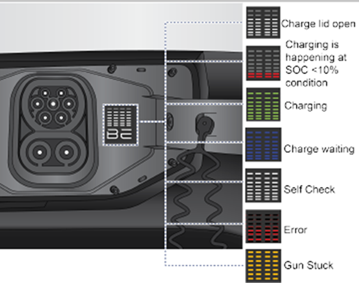
What do the LEDs in the Charge Port signify?
Indication Condition
- White (Solid): Battery status
- White (Blinking): System verification
- Blue (Blinking): Scheduled for charging
- Red (Solid): Low battery (SoC < 10%)
- Red (Blinking): Charger error
- Amber (Blinking): Charger Gun stuck
- Green (Animated): Charging in progress
What to do if Gun gets stuck in vehicle’s charge port?
If the Gun Lock is not released, use “Charge port disconnect switch” on the driver side switch bank to unlock the gun.
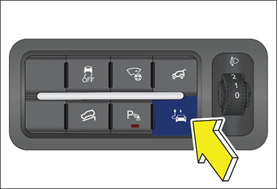
If the gun is still not able to be released, follow the manual over ride procedure.
Before initiating manual over ride procedure:
- Confirm that charging has stopped before attempting manual removal.
- Do not pull the release cable with high force or pull excessively as it may damage the locking mechanism.
- Do Not Touch The Connectors: Never touch the metal connectors during the manual override process, as doing so may result in burns, electrical shock, or serious injury.
Manual over ride procedure steps:
- The manual override cable is located on the left-hand side of the rear luggage compartment. Open the trunk and locate the trim cover on the Left-hand side quarter trim.
- Remove the safety cover.
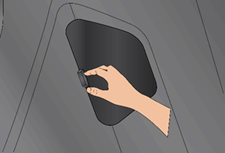
- To release the charger plug in case the electrical actuator is not functioning, pull the black handle release cable as shown in the image.
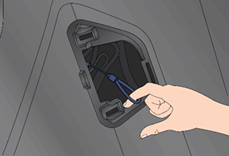
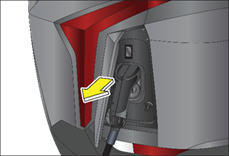
- After pulling the release cable, gently remove the charger plug.
- After removing the plug, make sure to close the lid.
What is the Charging Procedure for 7.2/11 kW Wall Box Charger?
Vehicle Connection
- Open the charging flap of the Vehicle.
- Insert the charger gun securely into the vehicle’s charging port.
- Wait for connection acknowledgment – the charger indicator will start blinking blue.
Authentication & Charging
- Tap a mapped RFID tag on the charger’s RFID scanner.
- Confirm charging initiation – the charger indicator will display a continuous blue light.
Stopping the Charging Process
- To stop charging, tap the same RFID tag again on the RFID scanner.
- Safely return the charger gun to its designated Gun holder.